The Agent Gateway Is Becoming the New API Gateway

CTO of MadAppGang
A support agent running on Amazon EKS can lose access to a tool because its proxy can't reach Google Cloud. The tool can still be healthy. So can the cluster. Google's cross-cloud preview documents this behaviour even when a team sets failOpen: true. That setting sounds like it was made for this exact situation.
Google's Agent Gateway for cross-cloud is in Limited Preview for Kubernetes clusters outside GKE, including EKS and Azure Kubernetes Service. The Envoy proxies run in your cluster; policy services such as Identity-Aware Proxy (IAP) and Model Armor run in Google Cloud.
That split makes this a useful design to study even if your company has no plans to use Google's gateway. It shows where an agent needs a different kind of control from an API client, and which decisions the platform team still has to make.
TL;DR: An agent gateway checks the identity of the caller and which tool it wants to use. It can also screen the payload when the policy calls for it. Google's preview brings those checks to other clouds, but your team still owns traffic routing, and a loss of connectivity to Google Cloud can block the governed requests.
Why agent traffic breaks the API gateway model
A conventional support frontend might call GET /orders when a customer opens their order history. The developer knows which endpoint the UI will hit. The API gateway can authenticate the caller, apply a rate limit and send the request to the orders service.
Give a support agent the same customer request and it might also look up a return policy through Model Context Protocol (MCP). If the customer asks for a refund, that same MCP server might also expose a tool that issues one. Our example agent can read the policy, but the refund goes through a separate approval step.
Both calls can go to the same host and the same HTTP endpoint. The distinction can be inside the request, in the MCP tool name and arguments. An HTTP rule for the host therefore tells you less than it would for two separately routed REST endpoints. The policy needs to know which workload is calling, what action it wants to take and, for sensitive actions, on whose behalf. The tool or backend still has to check business rules, such as whether the account owns the order.
There's also the content coming back from the tool. A ticket may contain customer text that asks the model to ignore the workflow. The ticket API can be legitimate, and the agent can be authorised to read it. Neither fact makes the ticket text an instruction. This is where payload screening can help, alongside the controls that decide which operations are available in the first place. The same distinction matters when teams choose an AI agent framework.
API gateway vs. service mesh vs. agent gateway
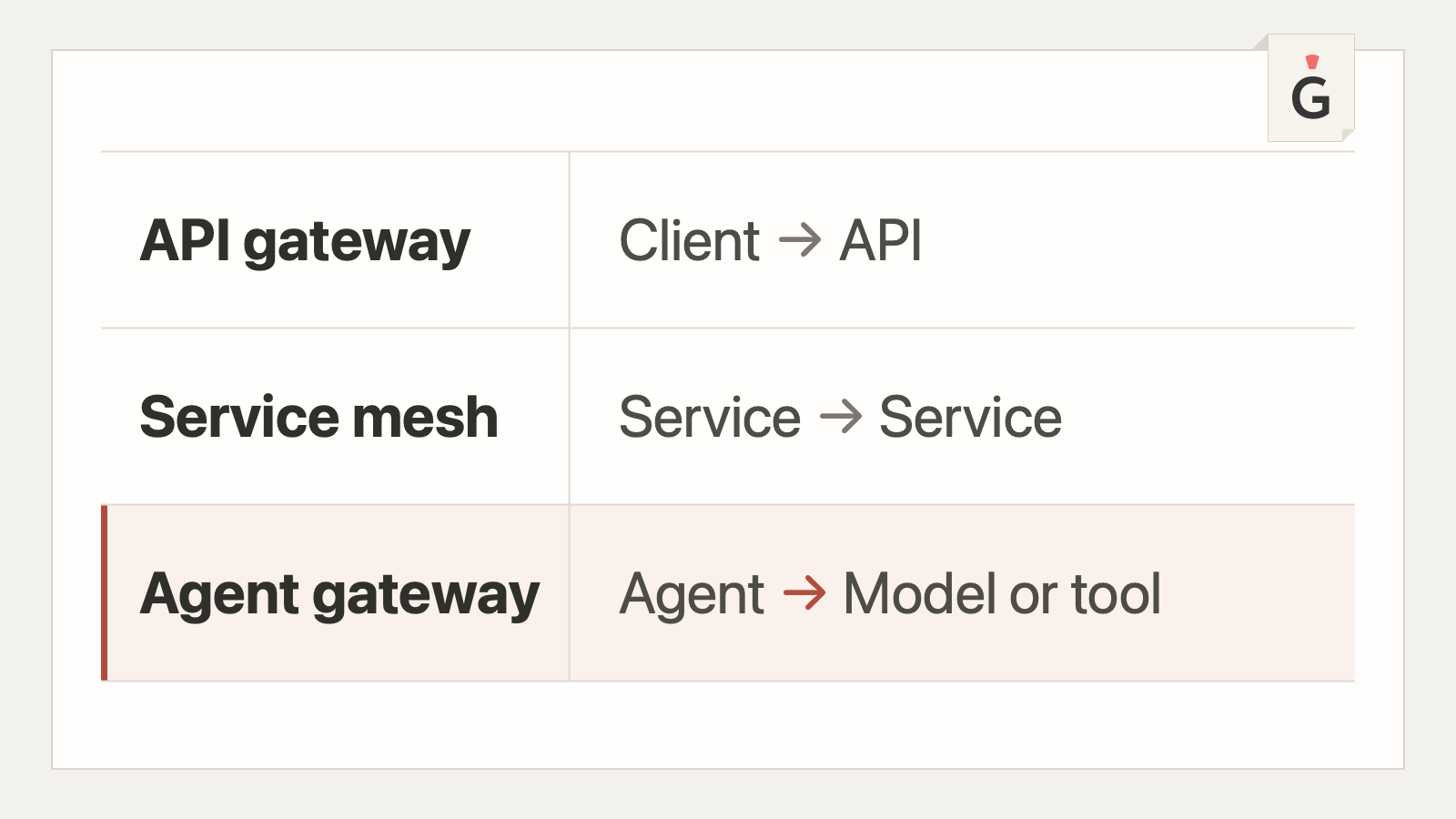
These names describe which decisions a component usually owns. Actual products overlap. Kubernetes Gateway API covers routing, for example, and an Istio service mesh can already enforce workload-level authorisation. The useful comparison is where each sits and what it has to understand to do its job.
| Component | Typical traffic | What it checks | Example policy |
|---|---|---|---|
| API gateway | Client → API | Client credentials, HTTP method and route, request rate | Customers can read orders via the public API; requests above the quota are throttled. |
| Service mesh | Service → Service | Workload identity, mutual TLS and service-level rules | The orders service can call inventory; the public frontend can't. |
| Agent gateway | Agent → Model or tool | Agent identity, tool name and, where appropriate, prompt or response content | The support agent can read the return policy but must send refund requests for approval. |
The paths are typical, not exclusive. An agent gateway can also protect inbound requests to an agent, and a service mesh can carry some of the traffic to it. In the refund example, the public gateway can authenticate the customer. The mesh can secure the connection from the support agent's service. The agent gateway can inspect the requested action on that connection. The refund service still owns the decision about whether the order qualifies and whether the approval is valid. A route rule is a poor place to store the return policy.
What Google's documentation reveals
Google describes three parts to the cross-cloud design: locally managed proxies, a shared control plane, and a group of managed services in Google Cloud. The proxy is where enforcement happens. It still depends on the configured services for some decisions. This matters when a request leaves the cluster, even if the agent itself never does.
Your governance now depends on another cloud's availability
The cross-cloud enforcement guide makes a distinction between an extension failing to evaluate a request and the proxy being unable to reach Google Cloud. With IAP, the latter blocks the request regardless of the failOpen setting. Google's preview overview also documents exceptions to fail-open behaviour for extension bindings, including a binding that points to a Model Armor template that doesn't exist.
The practical effect depends on the route. On EKS or AKS, the agent can be alive and able to receive a request while a governed tool call still fails. A regional outage is one possible cause. A broken network path or a bad change to your own egress configuration can break that dependency too. A cluster health check won't tell you whether the user can finish the task.
For an availability review, list every external policy service on a critical path. Then test the user-visible result when it's unreachable. For a read-only lookup, the product might show a cached answer marked with its age. For a refund, the safer behaviour is to stop and hand the request to a person. Decide which result users get before the weather report from another cloud becomes part of your support queue.
A gateway only governs traffic you route through it
Under Google's shared responsibility model, the customer forwards the traffic through the local proxies using its existing mesh or network stack. The customer also provides the network connectivity those proxies need to reach Google Cloud APIs. Installing a chart doesn't show that all relevant traffic is subject to policy.
For a governed agent, draw the routes to the model provider, tool servers and peer agents. Assign an owner to each path and record any approved exceptions. Use your network controls to limit direct access to protected destinations, and make sure the tool servers still authenticate requests themselves. If a direct connection can reach a destination outside the enforced path, that request is outside the gateway's control. That's a property of the traffic design, not a Google-specific defect.
Add a coverage test to release checks. A test workload with the same permissions as the agent should be able to use the approved route, and direct access to a protected destination should be denied. Run the test after network or workload changes. A dashboard that shows plenty of proxy traffic doesn't show how much went elsewhere.
The riskiest agents aren't covered yet
This limitation is specific to Google's GKE offering. Its GKE documentation says Agent Gateway supports agents deployed as standard Pods. It excludes Agent Substrate on GKE and Agent Sandbox on GKE. The same page says that access to the east-west Layer 7 ambient proxy preview requires contacting your Google Cloud account team.
Code execution makes that coverage gap important. An agent that can start processes or write files has a wider set of possible effects than a policy reader. Those workloads need controls for execution and network access even if standard Pods are already governed. Keep sandbox isolation, credentials and outbound access on the platform's coverage list. For the pilot report, record which workload types were actually tested. A clean result on standard Pods says very little about a workload you couldn't put behind that enforcement path.
“Free” has a meter attached
The cross-cloud pricing section says the gateway is available at no charge during Limited Preview. Model Armor, Cloud Logging and Cloud Trace are billed at their standard rates when you use them with it. The sample Model Armor binding screens all outbound traffic that passes through the gateway when you leave out match conditions. That can be wider than the set of payloads you meant to screen.
Estimate costs per completed workflow as well as per request. A support interaction may involve several model calls and lookups before it returns one answer, and each governed hop can add checks or telemetry. Use scoped bindings where appropriate, measure cost and latency on real traffic, and keep retention tied to a use case. The other cost is ownership: per-tool IAP rules depend on the destination MCP server being registered in Agent Registry, and someone has to keep that register current.
The GKE platform overview lists two supported regions, europe-west1 and us-central1. It puts the required version in the Rapid channel, but lists a different minimum build from the Kubernetes Engine page, so verify the exact build before planning a rollout. Cross-cloud policy examples use v1alpha1 custom resources, which is a reason to expect configuration changes before a broader rollout.
The policy decisions CTOs need to make
Give the agent an identity of its own
Use a verifiable workload identity so a policy can distinguish one agent from another. Keep it separate from the person asking the agent to act. For delegated operations, check the workload's right to invoke the tool and the user's right to act on the resource. Otherwise a user can inherit privileges from a shared service account without anyone deciding to give them those privileges.
Authorise tools by action
Start with a small allowlist per workload. A lookup and an operation that changes money or data belong in different permission groups, even if one server exposes both. Google's tool-level IAM examples show conditions in Common Expression Language (CEL) that name the server and the tool. Keep approval, account checks and other business rules in the system that owns the action.
Decide what happens when screening is unavailable
Write the failure rule alongside the screening rule. Fail-open lets a request proceed without a check when the service can't evaluate it, if your gateway actually supports that mode for the failure in question. Fail-closed blocks it. Neither is the same as knowingly allowing content that a filter has flagged. Classify routes by impact, and test the result of both a policy rejection and a policy service outage. A permission check for a payment should not fail open just to keep a status indicator green.
Give the registry an owner
Put the registry under the team that can approve new tools and remove old ones. A registry entry should have an owner, a description of what the tool can change, and a way to withdraw access quickly. When a team renames a tool or moves a server, review the policy as part of that change. A directory is useful for discovery. An enforcement directory also belongs in the release process.
A cloud-neutral agent governance checklist
The same controls can be assembled from generally available parts, including workload identity, an open-source proxy, and a policy engine such as Open Policy Agent or Cedar. The checklist applies whether you assemble those parts yourself or buy a managed gateway.
- Map agent-to-model, agent-to-tool and agent-to-agent routes; write down where each policy is enforced.
- Give each workload a distinct identity and retain the user's identity when a tool acts on their behalf.
- Allow only the tools each agent needs, and require approval for actions with serious or irreversible effects.
- Test network coverage by verifying that a protected destination is reachable only through approved routes.
- Specify where content is screened and exercise the expected response to a policy service outage.
- Assign owners to registry entries and include tool changes and retirement in the release process.
- Decide which data may leave the cluster, redact sensitive telemetry and trace policy outcomes alongside agent behaviour.
- Observe decisions in dry run where available, then enforce in stages with a rollback plan and named owner.
For example, IAP dry run records the authorisation decisions without rejecting unauthorised requests on that basis. Treat that log as test output, not evidence that a route is protected. Compare the decisions against real expected permissions, review surprising allows and denies, and check for paths that never showed up in the log. Measure gateway and extension latency while you do this. A cheap policy that adds too much time to every tool call can still make the workflow unusable.
Conclusion
An agent gateway gives platform teams one place to check a decision the application makes at runtime. That makes it useful alongside the API gateway and the mesh that already run in production. The design still depends on traffic coverage, the authority of the service making the final change, and what happens when a policy service is down. Google's preview is a good example of why those boundaries should be written down before a rollout. Start with one production workflow, test the paths you intend to reject and prove that the failure mode is acceptable before you put more agents behind it.
FAQ
What is an agent gateway?
An agent gateway is a policy enforcement point for traffic to or from AI agents. It can check the agent's identity, authorise a specific tool call and screen prompts or responses on routes that require it.
How is an agent gateway different from an API gateway?
An API gateway typically makes decisions about the client and HTTP route. An agent gateway can also inspect the tool or action inside a request, even when several operations use the same endpoint. A deployment can use both.
Can I use Google's Agent Gateway outside Google Cloud?
Yes, in Limited Preview for supported Kubernetes deployments such as EKS and AKS. The proxies run in your cluster and the policy services run in Google Cloud. Your team routes traffic to the proxies. Governed requests can fail if the proxy can't reach Google Cloud.

